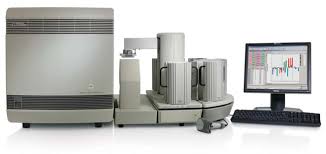
When genomic discoveries are being made at such a breakneck pace, the tools you use can make all the difference in your research efforts. A sequence detection system (SDS) is essential for automating DNA and RNA analysis, ensuring both speed and accuracy in biopharmaceutical companies as well as academic research labs.
The Applied Biosystems (ABI) 7900HT Fast Real-Time PCR System has been the scientific community’s go-to for years. But with next-gen, smart-cloud-based platforms such as the QuantStudio 7 Read and the Roche LightCycler 480 II now available, many lab managers are faced with: do I squeeze more life out of my ageing 7900HT or take a leap and invest in a new platform?
Here is a practical look at the data to help you decide.
The Legacy of the ABI 7900HT
The ABI 7900HT is not only “old tech,” it’s a well-vetted platform that defines capacity and ease of use for a high-throughput laboratory. It is capable of interchangeable blocks with its modular design, and by use of the Fast Real-Time upgrade, it remains viable.
The speed is one of its strongest selling points. In-house time-to-answer is decreased from 2 h to 35 min with the Fast system. 75% less running time translates into a swift turnaround of experiments for the researchers. And, for labs processing large numbers of campaigns, the system can run automatically with the Zymark Twister Microplate Handler, which can process batches of 84 plates per unsupervised session.
Performance Breakdown: Accuracy Meets Volume
Speed means nothing without accuracy. Fortunately, the 7900HT shines in this area as well. Experiments by Applied Biosystems have shown the system to perform very well even with difficult, GC-rich templates (>50% GC) and low-level expressing templates.
Regardless of either standard or fast run mode, the performance is good. For example, it is capable of distinguishing between the samples with 5,000 and 10,000 template copy numbers even at a confidence level of 99.7%. If the QPCR assay in your lab has known, difficult-to-amplify targets, then you might still be better off with the 7900HT.
The Data Challenge: Managing 200MB+ Per Day
Where the age of the 7900HT begins to show is in data management, whereas in terms of hardware, it stands up. The 7900HT can produce more than 200 MB of data in one continuous, real-time run lasting 24 hours.
At the time, in the first years of the 2000s, that was an enormous amount of information to keep locally. Today, the problem isn’t keeping all that stuff; it’s visualizing and accessing it. Core App Dashboard visuals are the “charts/data” that get rendered into a dashboard page by an interface to visualize it for our modern humans. The charts/data are what make this data easily consumable.
Instead of running on local servers and exporting to basic spreadsheets (as the 7900HT does), modern instruments leverage cloud capabilities (e.g., Thermo Fisher Connect) that make it possible to monitor, analyze and visualize data remotely from any location.
Comparison: ABI 7900HT vs. Modern Alternatives
In order to assist you in your decision-making process, Drummond Scientific has put together a side-by-side comparison of the enhanced ABI 7900HT versus it’s present day colleagues, such as the QuantStudio 7 Pro or LightCycler 480 II.
| Feature | ABI 7900HT (Fast Upgrade) | Modern Alternatives (e.g., QuantStudio 7 Pro) |
| Run Time | ~35 Minutes (Fast Mode) | < 30-40 Minutes |
| Throughput Capacity | Up to 84 plates (with Zymark Handler) | Integrated Stacks / Continuous Loading |
| Block Flexibility | Interchangeable (96/384/TaqMan Array) | Motorized Interchangeable (96/384/TAC) |
| Data Connectivity | Local / Server-based (Ethernet) | Cloud-based / Voice Control / Remote Monitoring |
| Daily Data Output | 200MB+ (Requires strict archiving strategy) | Unlimited Cloud Storage / Real-time Sync |
| Validation | Proven industry standard | Smart Help / Facial Authentication |
To Upgrade or Maintain?
Ultimately, it is a trade-off between how much you want to pay and how much data volume you need.
- Keep/Serve Upgrade: For labs that currently have a 7900HT, upgrading to the Fast System is a cost-effective service offering. You achieve 75 percent faster speeds without having to make a capital investment in a brand-new instrument. It’s a great setup for laboratories that require raw throughput and are comfortable with managing data in-house.
- Purchase New: If you need a remote access, cloud collaboration, facial authentication security system that weighs less than the 7900HT and is not stuck in the late 90’s, then modern systems are looking at how to go.
Conclusion
The ABI 7900HT is an illustration that for raw throughput, newer isn’t always just better. With 35 minutes of run time and the ability to batch out in large quantities, it still puts to shame many entry-level products of today. But if your lab is heading towards smart, self-integrated workflows, the lack of modern dashboards and cloud connection may be an issue. Consider your daily data volume and workflow requirements before you sign that purchase order.
Frequently Asked Questions
Can I increase the speed of my existing ABI 7900HT?
Yes. Low-cost service upgrade to “Fast System,” decreasing run times by 75% (down to ~35 min.).
How much data is produced on the 7900HT?
The system produces over 200 MB of data over a single day (a full 24-hour cycle when running), and it is necessary to archive it in a systematic way.
Does the 7900HT work with hard DNA templates?
Absolutely. The method has been demonstrated to be highly reliable for the determination, even of low-expressing and GC-rich (>50%GC) templates.
Is the 7900HT capable of higher throughput?
The system can be used to process batches of up to 84 plates with the Zymark Twister Microplate Handler without user interaction.
How frequent do I need to calibration the device?
The background, pure dye, and verification runs should be run every 6 months to guarantee good quality results (Applied Biosystems recommendation).
Write and Win: Participate in Creative writing Contest & International Essay Contest and win fabulous prizes.
About the Author