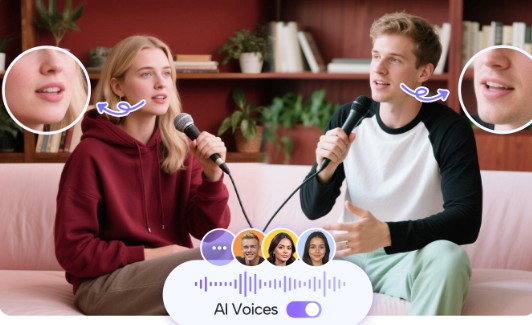
Make a Video Podcast with Realistic AI Voices
Introduction
Video podcasts have become one of the most effective ways to share ideas and grow an audience online. But traditional production—recording audio, filming on camera, editing, and adding effects—can take hours or even days.
Now, thanks to Artificial Intelligence, anyone can produce high-quality video podcasts without technical skills or studio equipment. Using the best AI podcast generator, creators can transform written scripts into realistic video podcasts complete with human-like voices and lifelike digital hosts.
In this article, you’ll learn exactly how to create your own video podcast using JoggAI, step by step.
Why Choose AI for Video Podcast Production
AI simplifies podcast creation by automating the hardest parts of the process. Instead of recording, editing, or syncing video manually, JoggAI handles everything—voice generation, visuals, timing, and background setup.
This makes it perfect for creators, teachers, and brands that want professional-quality results without expensive gear or long production schedules.
Key benefits include:
- Realistic AI voices that sound human and engaging
- Lifelike avatars that act as on-screen presenters
- Instant generation of both audio and video podcasts
- Low cost compared to traditional production methods
- Multilingual options for global audiences
Now, let’s go step by step through the process.
Step 1: Prepare Your Script
Start by writing your content or choosing existing material. This can be an article, lecture notes, or talking points. Keep sentences clear and natural so the AI voice reads them smoothly.
Once ready, upload the text to the best AI podcast generator or paste it into JoggAI’s editor. The system automatically formats it into a readable script optimized for narration.
You can preview how the text will sound when spoken, and edit any sections before moving on.
Step 2: Generate and Review the Script
After uploading, click “Generate Script.” The AI will analyze your content and convert it into spoken-style language. This ensures that your text sounds conversational when read aloud.
If you’re creating a podcast for education or storytelling, you can adjust tone and pacing directly in the editor. JoggAI helps structure your script naturally with pauses and emphasis in the right places.
Step 3: Choose a Realistic AI Voice
Next, select your podcast’s narrator. JoggAI offers an extensive library of realistic AI voices, each with distinct tones, accents, and emotional depth.
You can:
- Choose between male or female voices
- Adjust pitch, speed, and emotion
- Preview how each voice sounds with your script
What makes JoggAI stand out is how natural its voices feel. They use subtle inflection and rhythm that mimic real human conversation, giving your podcast warmth and authenticity.
Step 4: Add an AI Avatar for Your Video Host
To transform your audio podcast into a video podcast, you can add a virtual presenter. JoggAI allows you to select from multiple digital hosts powered by its AI avatar generator.
Each avatar looks realistic, moves naturally, and lip-syncs perfectly with your chosen AI voice. You can customize their outfit, expressions, and background to match your podcast theme or brand.
For example, an educator can choose a formal avatar for online lessons, while a lifestyle podcaster might prefer a friendly, casual host.
Step 5: Generate Your Video Podcast
Once your script, voice, and avatar are ready, click “Generate Podcast.”
JoggAI’s AI engine synchronizes everything automatically—the voice, avatar, visuals, and timing. Within minutes, it produces a high-definition video podcast that looks and sounds professionally edited.
You can choose to:
- Create an audio-only version (MP3)
- Generate a video podcast (MP4) with your virtual host
The final output includes clear audio, perfect lip-syncing, and natural transitions—without needing any video editing software.
Step 6: Download and Publish
When generation is complete, download your podcast in the desired format. JoggAI’s output is compatible with all major platforms, including YouTube, Spotify Video, and Apple Podcasts.
Simply upload your file, add your title and description, and publish. Many users report producing entire podcast episodes—from text to upload—in under 20 minutes.
Voice Quality and Realism
One of the most impressive aspects of JoggAI is the natural tone of its AI voices. The system captures subtle variations in pitch, emotion, and rhythm, making it sound nearly indistinguishable from real speech.
You can also mix voices across episodes to create a multi-speaker format or use regional accents for localized versions. The technology adapts automatically, ensuring consistency and clarity across episodes.
Why Use Avatars in Video Podcasts
Adding avatars gives your content a visual identity. Instead of showing slides or static graphics, you can present information with an expressive digital host who connects directly with viewers.
Benefits of using avatars include:
- Higher engagement: Viewers stay longer when there’s a visual presenter.
- No need for filming: Save on cameras, lights, and studio space.
- Consistent branding: Keep the same host across episodes.
- Accessibility: Multilingual avatars allow you to produce global versions of your podcast easily.
These features make JoggAI ideal for creators who want to scale their video production while maintaining professional consistency.
Editing and Customization
Although the process is automated, JoggAI gives users creative control. You can:
- Modify the script directly in the editor
- Regenerate specific sections of audio or video
- Add background music or effects
- Adjust gestures or facial expressions of avatars
This hybrid system balances automation with flexibility, allowing both beginners and professionals to fine-tune their results.
Real User Example
A fitness coach used JoggAI to convert her weekly workout articles into video podcasts. She uploaded her text, chose an energetic female AI voice, and selected a sporty virtual avatar.
Within ten minutes, she had a polished video podcast ready for YouTube. Her subscribers loved the new visual format, and she no longer had to record or edit each episode manually.
This real-world example shows how easily creators can scale content using AI-driven video podcasting.
Comparison: AI vs Traditional Production
| Feature | JoggAI (AI Production) | Traditional Production |
| Recording | Not required | Manual recording needed |
| Equipment | None | Camera, mic, studio |
| Voice Quality | Realistic AI voices | Depends on recording setup |
| Editing | Automated | Manual, time-consuming |
| Production Time | Minutes | Hours or days |
| Cost | Low | High |
This comparison highlights how much faster and more efficient AI-driven podcasting is compared to traditional methods.
Tips for Better AI Video Podcasts
- Write scripts in short, conversational sentences.
- Use punctuation to guide voice rhythm.
- Choose avatars and voices that reflect your brand’s tone.
- Keep episodes between 8 and 15 minutes for engagement.
- Preview before publishing to ensure smooth pacing.
Following these tips helps make your AI podcasts sound and look more natural.
Conclusion
Creating a video podcast no longer requires microphones, cameras, or editing software.
With JoggAI, the best AI podcast generator, you can turn any written content into a lifelike video podcast with realistic AI voices and expressive digital hosts powered by the AI avatar generator.
In minutes, you can go from script to studio-quality show—ready to share with the world. For creators, educators, and brands looking to save time and maintain quality, JoggAI is the smartest way to make video podcasts in 2025.
Write and Win: Participate in Creative writing Contest & International Essay Contest and win fabulous prizes.
About the Author