If you’ve ever tapped your smartphone to make a payment, open a hotel room, or launch a website, you’ve already used NFC (Near Field Communication) technology. What many people don’t realize is that the same kind of interaction can be customized and programmed for personal or business use—with a simple NFC tag and a smartphone.
This article will walk you through how to program NFC tags without writing a single line of code. Whether you’re looking to simplify your daily routine, upgrade your business cards, or add automation to your home or workspace, this guide covers everything you need to get started.
What Are NFC Tags?
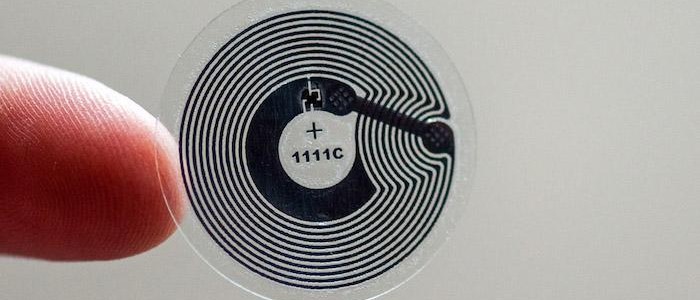
NFC tags are tiny chips—usually embedded in stickers, cards, wristbands, or key fobs—that can communicate with smartphones and other NFC-enabled devices when tapped. These tags don’t require batteries and are powered by the device that scans them.
They can be programmed to trigger a wide range of actions, such as:
- Opening a website
- Sharing contact information
- Connecting to a Wi-Fi network
- Sending a text message
- Launching an app
- Automating smart home routines
And the best part? You don’t need to be a developer or tech expert to use them.
Why Use NFC Tags?
Here’s why NFC tags are gaining popularity across personal, business, and industrial use cases:
1. Convenience
One tap can perform multiple tasks—without searching for apps, scanning QR codes, or typing URLs.
2. Automation
From controlling lights and launching apps to sending preset messages, NFC tags help automate daily routines.
3. Marketing and Networking
Businesses use NFC to direct users to a product page, offer a discount, or even share a digital business card instantly.
4. Customization
Each tag can be uniquely programmed, rewritten (unless locked), and placed virtually anywhere.
What You Need to Start NFC Programming
You’ll only need a few tools to begin your nfc programming journey:
1. NFC-Compatible Smartphone
Most Android devices and iPhones (from iPhone 7 onward) support NFC. Ensure NFC is enabled in your settings.
2. Blank NFC Tags
Choose NFC tags like NTAG213, NTAG215, or NTAG216 for broad compatibility. These tags can be purchased online in the form of stickers, cards, or keychains.
3. NFC Tag Writing App
Several free apps allow you to write data to tags without code. Popular options include:
- NFC Tools (Android/iOS)
- NXP TagWriter (Android)
- Smart NFC (iOS)
These apps offer easy interfaces and pre-set tasks you can assign to your tags.
How to Program an NFC Tag – Step-by-Step
Here’s a step-by-step walkthrough using a typical NFC app:
Step 1: Install an NFC App
Download one of the NFC writer apps from your device’s app store. NFC Tools is a great place to start for beginners.
Step 2: Choose Your Desired Action
Most NFC apps provide a menu of actions you can assign to a tag. Common tasks include:
- Opening a website
- Sending an SMS or email
- Connecting to Wi-Fi
- Sharing location
- Launching a mobile application
- Customizing phone settings (e.g., switching to silent mode)
Example: Let’s say you want to program a tag to open your portfolio website. Simply select “URL/URI” and enter the web address.
Step 3: Write to the Tag
After selecting the action, tap “Write” or “Start Writing” in the app. Then place your phone on the blank NFC tag. Within seconds, the app will write the data to the tag.
Step 4: Test the Tag
Remove and re-tap your phone against the tag. It should now perform the action you selected—open your website, send a message, or adjust settings.
Step 5: (Optional) Lock the Tag
Some apps allow you to “lock” the tag after programming. This prevents further edits but should only be done if you’re certain the tag won’t need updating in the future.
Use Cases for NFC Tags
1. Smart Home Automation
Place tags at key locations in your home:
- On your nightstand: Set an alarm and turn off the lights.
- By the door: Turn off appliances, lock doors, and send a “leaving home” text.
2. Workplace Efficiency
At your desk, a tag can:
- Enable Do Not Disturb mode
- Launch your calendar or time-tracking app
- Open work-related websites or platforms
3. Marketing and Events
Businesses can:
- Attach NFC tags to posters that open landing pages
- Use tags for digital check-in at events
- Share business cards with a tap—no paper required
4. Retail and Restaurants
Restaurants and cafes can place tags on tables that:
- Open digital menus
- Collect feedback
- Share promotions or social media links
Retail stores can place tags near products to provide:
- Additional info or specifications
- Product reviews
- Instant checkout links
Best Practices for Using NFC Tags
1. Label or Color-Code Your Tags
Especially if you’re placing multiple tags in one area, labeling helps you remember what each tag does.
2. Use Quality Tags
Low-cost tags may have limited memory or poor compatibility. Stick with NTAG213/215/216 models for best results.
3. Avoid Metal Surfaces
Placing NFC tags on metal can block signals. Use foam or adhesive spacers to prevent interference if necessary.
4. Secure Sensitive Actions
Avoid placing tags that trigger sensitive tasks (e.g., payments, private messaging) in public places. If necessary, set your device to require approval before executing such actions.
5. Update and Maintain
Unless locked, NFC tags can be rewritten. Keep them updated with current URLs or details, especially for marketing or promotions.
Limitations of NFC Tags
Despite their versatility, NFC tags have a few limitations:
- Short Range: NFC requires close proximity (usually within 1–4 cm).
- Limited Storage: Most tags store only a few hundred bytes—enough for URLs, contact info, or simple commands.
- Not All Devices Can Write Tags: Older phones and some iPhones (pre-iPhone 7) may not support NFC writing.
- No Built-in Logic: NFC tags don’t “think”—they trigger fixed actions unless paired with smart apps or routines.
NFC vs QR Codes
Both NFC tags and QR codes serve similar purposes—linking users to digital content. However:
| Feature | NFC Tags | QR Codes |
| Interaction | Tap (no camera needed) | Scan with camera |
| Design | Hidden/Invisible | Must be printed and visible |
| Speed | Instant tap | Requires focus and scan |
| Durability | Waterproof, wearable | Can fade or be damaged |
| Cost | Slightly higher (hardware) | Free (printable) |
For quick, discreet, and modern interactions, NFC tags offer a more elegant experience, especially when aesthetics and user convenience matter.
The Future of NFC Programming
As smartphones and IoT devices continue to evolve, nfc programming will become increasingly central to how we interact with our environments. In the near future, we can expect:
- More automation in smart homes
- Seamless travel experiences (hotel room access, transport tickets)
- Smarter retail experiences (auto-checkout, product customization)
- Greater adoption in healthcare and education
Even now, leading-edge businesses and consumers are tapping into the benefits of NFC for frictionless experiences.
Final Thoughts
Learning how to program NFC tags is a simple yet powerful way to bring automation into everyday life. With just a smartphone and a few inexpensive tags, you can create personalized interactions that save time, improve customer engagement, and make your environment smarter.
You don’t need technical skills or programming knowledge to get started—just curiosity and a desire to simplify your world.
So go ahead: tap into the future, one tag at a time.
Write and Win: Participate in Creative writing Contest & International Essay Contest and win fabulous prizes.
About the Author